Configuration
Never edit a player's coin balance while the script is running. Always shut down the script first or use the built-in commands.
The script uses Font Awesome Icons (free). In some cases you can write HTML directly in the config.
Direct Purchases (v1.2.5+)
You can create packages on your Tebex store that deliver rewards directly to players once they are online.
Step 1: Create a command on your package settings:
luxu_vipshop_redeem_purchase {sid} {packageId} {transaction}
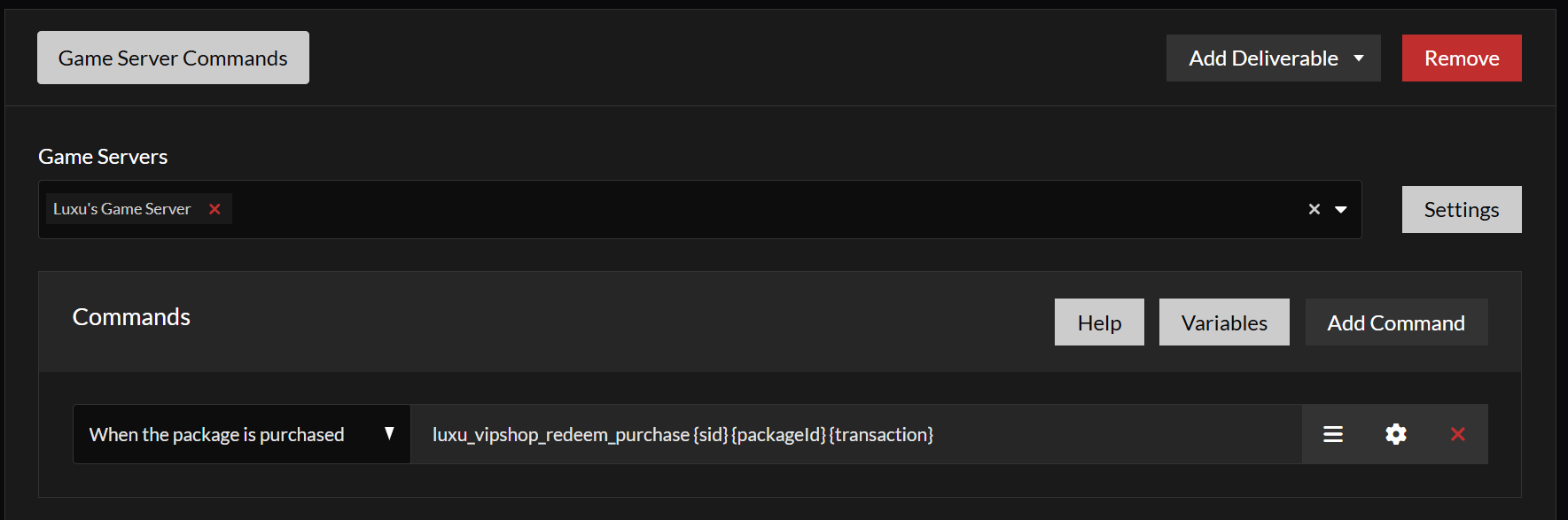
Step 2: Configure the rewards in config.lua. Specify the package ID and its rewards.
Example — a package that rewards:
- 1000 coins
- 1 pistol
- 10 pistol bullets
- 1 "Nero" vehicle
Config.Tebex = {
      redeem = true,
      packages = {
            {
                  label = "100 Coin package",
                  coins = 100,
                  packageID = 5724500
            },
            {
                  label = "5000 Coin package",
                  coins = 5000,
                  packageID = 5723242,
            }
      },
     direct_purchases = {
+            ['5721342'] = {
+                  coins = 1000,
+                  products = {
+                        { label = "Pistol",      value = "weapon_pistol", category = "item",    amount = 1 },
+                        { label = "Pistol Ammo", value = "pistol_ammo",   category = "item",    amount = 10 },
+                        { label = "Nero",        value = "nero",          category = "vehicle", amount = 1 },
+                  }
+            }
   }
}
Locked Menus
Lock menus to specific ace permissions:
-- Example: menuId - ace permission
Config.LockedMenus = {
      ["weapons"] = "luxuvipshop.vip",
      ["diamond"] = "luxuvipshop.diamond",
}
Home Page
The Home page has two rows: Donator/VIP Packages and Mystery Boxes. Each row can be disabled.
Donator Packages (Row 1)
This row displays paid packages or donator roles. Players can click the buy button to open a link in their browser.
Config.HomeMenu = {
      label = "Home",
      value = "home",
      icon = "<i class='fa-solid fa-house'></i>",
      firstRow = {
            enabled = true,
            title = "Coins",
            sizing = 'static', -- static | dynamic
            packages = {
                  {
                        image = "https://www.svgrepo.com/show/452101/silver-medal.svg",
                        label = "Donator Rank Bronze",
                        value = "$5",
                        button = {
                              label = "Buy Now",
                              link = "https://fivem.luxu.gg/package/5453166"
                        }
                  },
                  {
                        image = "./coins.svg",
                        label = "Donator Rank Silver",
                        value = "Price: $10",
                        button = {
                              label = "Buy Now",
                              link = "https://fivem.luxu.gg/package/5453166"
                        }
                  },

                  ...
Mystery Boxes (Row 2)
Players can purchase mystery boxes that contain one random item.
- Set the probabilities (they must sum to 1)
- Create a box and assign a name (e.g.
BOX_1_NAME) - Add all four rarity groups: common, uncommon, rare, legendary
- Add items to each group
--[[ Available Colors: red, blue, green, yellow, purple, orange, pink ]]

Config.MysteryBoxes = {
      groups = {
            ['common'] = {
                  probability = 0.6,
                  color = "blue"
            },
            ['uncommon'] = {
                  probability = 0.2,
                  color = "purple"
            },
            ['rare'] = {
                  probability = 0.15,
                  color = "red"
            },
            ['legendary'] = {
                  probability = 0.05,
                  color = "yellow"
            },
      },  -- Probabilities must sum to 1
      boxes = {
            ['BOX_1_NAME'] = {
                  ["common"] = {
                        {
                              label = "Coins",
                              value = "coins",
                              category = "coins",
                              amount = 5,
                        },
                  },
                  ["uncommon"] = {
                        {
                              label = "Carbine Rifle Mk II",
                              value = "weapon_carbinerifle_mk2",
                              category = "weapon",
                              amount = 1,
                        },
                        {
                              label = "Special Carbine Mk II",
                              value = "weapon_specialcarbine_mk2",
                              category = "weapon",
                              amount = 1,
                        },
                  },
                  ["rare"] = {
                        {
                              label = "Carbine Rifle Mk II",
                              value = "weapon_carbinerifle_mk2",
                              category = "weapon",
                              amount = 1,
                        },
                  },
                  ['legendary'] = {
                        {
                              label = "Special Carbine Mk II",
                              value = "weapon_specialcarbine_mk2",
                              category = "weapon",
                              amount = 1,
                        },
                  },
            },

      }
}
In Config.HomeMenu, reference the box by its name:
Config.HomeMenu = {
...

 MysteryBoxes = {
            enabled = true,
            title = "Mystery Boxes",
            sizing = 'static', -- static | dynamic
            img = nil,
            packages = {
                  {
                        title = "Mystery Box 1",
                        description = "Weapons",
                        price = 50,
                        items = Config.MysteryBoxes.boxes['BOX_1_NAME']
                  },
            }
      }
}
Products Page
By default the coin shop includes two pages: Cars and Weapons. You can modify or remove these, and add new ones.
Product Categories
Three built-in categories:
itemvehicleweapon
Custom Product Categories
Custom categories can be created in server/customProducts.lua. Always return true when the operation succeeds, otherwise the item will not be removed from the player's inventory.
Creating a Product Page
Config.Menus = {
      {
            enabled = true,
            label = "Vehicles",
            value = "vehicles",
            icon = "<i class='fa-solid fa-car'></i>",
            products = {
                  {
                        label = "Nero",
                        value = "nero",
                        category = "vehicle",
                        amount = 1,
                        price = 100,
                  },
                  {
                        label = "Buffalo S",
                        value = "buffalo2",
                        category = "vehicle",
                        amount = 1,
                        price = 200,
                        custom_img = "https://image-link.png",
                        info = {
                              icon = true,
                              title = "Hello this is a custom title",
                              body = "Description of this product lorem ",
                        },
                  },
                  {
                        label = "Issi",
                        value = "issi2",
                        category = "vehicle",
                        amount = 1,
                        price = 300,
                        custom_img = "./image.png",
                  },
                  {
                        label = "Sabre Turbo",
                        value = "sabregt",
                        category = "vehicle",
                        amount = 1,
                        price = 500,
                  },
                  {
                        label = "Zion",
                        value = "zion",
                        category = "vehicle",
                        amount = 1,
                        price = 600,
                  },
            },

      },
When a player purchases an item, it is added to their inventory. On withdrawal, the server executes the built-in logic and any custom logic for custom categories.
Limited Stock Products (Optional)
Define stock groups:
Config.Stock = {
      ["Stock_ID"] = {
            ["Item_name"] = 10
      },
      ["mystock"] = {
            ["weapon_pistol"] = 100,
            ["weapon_combatpistol"] = 20
      }
}
Assign a stock ID to a product:
 {
            enabled = true,
            label = "This Page is using Stock",
            value = "stockpageexample",
            icon = '<i class="fa-solid fa-cubes-stacked"></i>',
            products = {
                  {
                        label = "Pistol",
                        value = "weapon_pistol",
                        category = "weapon",
                        amount = 1,
                        price = 100,
                        stockID = "mystock",
                        info = {
                              icon = true,
                              title = "Hello this is a custom title",
                              body = "This product is using stock",
                        }
                  },
                  {
                        label = "Pistol",
                        value = "weapon_pistol",
                        category = "weapon",
                        amount = 1,
                        price = 100,
                        -- no stockID = unlimited stock
                        info = {
                              icon = true,
                              title = "Hello this is a custom title",
                              body = "This product has unlimited stock",
                        }
                  },
            },

      },
Custom Images
The VIP shop includes default images for weapons and vanilla vehicles. For other items, you need to provide your own.
Three options:
- Point to a resource that already has images (e.g. inventory)
- Host images on a CDN (e.g. imgur.com)
- Store images inside the VipShop
nuifolder (least recommended)
{
   label = "Water",
   value = "Water",
   category = "item",
   amount = 1,
   price = 100,
+  custom_img = "URL"
},- URL =
https://cfx-nui-qb-inventory/html/images/water.png(inventory resource) - URL =
https://i.imgur.com/b5fqSGk.png(external CDN) - URL =
./images/water.png(LuxuVipShop/nui/images/water.png)
Tebex Redeem
To allow players to redeem Tebex purchases, configure your package IDs. Requires your Tebex secret.
Config.Tebex = {
      redeem = true,
      packages = {
            {
                  label = "1000 Coin package",
                  coins = 1000,
                  packageID = 5721342
            },
            {
                  coins = 5000,
                  packageID = 5723242,
            }
      }
}
Play Time Rewards
Reward players with coins for time spent online:
Config.PlayRewards = {
      enabled = true,
      delay = 20,              -- minutes before reward
      coin_reward = { 1, 20 }, -- random coins between 1 and 20
}
Info Page
The info page explains the coin shop to players. Supports Markdown or custom HTML.
Config.InfoPage = {
      html = {
            enabled = false,
            pre_styled = true,
            src = './info.html'
      },
      markdown =
      [[

# Information

### Links

* Website: https://luxu.gg
* Store: https://luxu.gg
* Discord: https://discord.gg/luxu

]]